Jump The Wall
2012-08-06

Turn down the music. Close the door. Look around. Is anyone looking at you? Are you being watched? Are there any security cameras? If not, we can go on.

Turn down the music. Close the door. Look around. Is anyone looking at you? Are you being watched? Are there any security cameras? If not, we can go on.

They say that competition in trade is good. Good for consumers, that is. It lowers prices and so on. But inside computers it creates problems for those using them.
Usually, competition is contained in ABAP at the data level, blocking ( euqueue ) certain tables based on their key. But sometimes, something more violent may be required to ensure that a program may not run more than once at the same time. The ESINDX lock object can be used to do this.
ABAP programs are all too well behaved, too predictable.
As demiurges, we have a moral obligation to give them a little free will, give them a scent of chaos, show them the trees of life and of knowledge, and in a passage through kenosis , give them free reign to take a bite from the apple. Only in this way will we feel complete and fulfilled, only by this means will we be able to rest on the seventh day.
There is nothing better to achieve this than random numbers.
Remote function calls (by RFC) do not support parameters with complex structures (deep structures). In other words, if any of the parameters has a structure in which one of the fields is another structure or an internal table then, hard luck, it won’t work.
Do you give up? No, you don’t. Abapinho provides the solution: serialization.

You have just produced a wonderful report headed by a selection screen crammed full of very interesting fields. But usually those running the report will not know, if it has some complexity, what each of the fields does. There are, of course, the technical and functional specifications for this. But are there? And even if there are, wouldn’t it be easier if you could press F1 on top of each field and find out there and then what it’s for?
I’ll show you two possible ways to give individualized information about the fields of a selection screen.

At the bottom right corner of ABAP editor, right in the status line, you can check in which line and column the cursor is. By double clicking over that information a dialog box is shown and you will be able to introduce a line number to it skip directly. The short key is CTRL-O. It’s very helpful.
Thank you Fábio Branquinho for the tip.
And thank you to juandesant for the photo.

Did you know that is possible to search in SAP menus? Probably yes. Well, I didn’t. I’ve spent years looking through menu S000 searching for the most random stuff imaginable. I’m sure that if I had done menu search I would have found most of them in seconds. Sometimes you just don´t think of the obvious.
Thank you Sérgio Fraga for the tip.
Greetings from Abapinho.
Some numbers have dots, some numbers have commas and some numbers have dots and commas. The problem is that there are also numbers that have commas and dots. The thing is, there are commas that are dots and dots that are commas, depending on where you are from, in other words, depending on user’s configurations. When importing a file with decimal numbers, these numbers’ alpha-numeric fields must be converted into numeric fields. It is not uncommon for this conversion to be carried out manually or even with the feet but there is a function module that makes life easier and converts it clearly and automatically:

The dictionary has the following entry for “style”: “set of formal aspects and expressive resources that characterise a text.”
It is preferable to read a text with style than one without. If ABAP were a language, a program in ABAP would be a text. When it comes to style, there are programs that seem to have been written by the feet, while there are others that one would swear the quill that wrote them was guided by the pure hand of an eighteenth century lady plagued by the troubles of love. Fortunately, I think it’s not possible to write programs in ABAP as tacky as the last sentence.
The “style” label is used here in Abapinho to identify articles that talk about just that: style. These articles try to find ways to improve the style of ABAP programs. This is one of Abapinho’s favourite labels, as you can see here. And what you are reading is another of those articles.
Moving on.
Throughout all my “SAP life” I’ve used the command /olalala to initiate the lalala transaction in a new GUI window. Until now I had never tried just writing /o. I did today. The result was interesting.
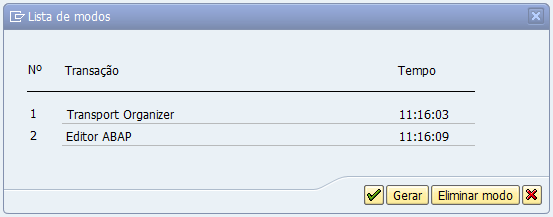
Meaning, it’s the same as going to SM04 and then choosing our user. But much easier.
Greetings from Abapinho