Client or Customer?

images/thumbnail.jpg - Thumbnail

Wherever you use the data element KUNNR, its descriptions is “Client”. And what if we wanted to change this field description from “Client” to “Customer”? “Customer" is so much nicer! Or let’s suppose that the company you work for is trafficking in drugs and tells you that they want “Dealer” rather than “Supplier” to appear in the LIFNR field. Obviously we can label it as we wish on screens and Z reports but what about standard transactions?

Adding buttons to the selection screen

images/thumbnail.jpg - Thumbnail

Normally, when buttons must be generated for users to click, Screen Painter is used to create a screen which is then invoked by the report using CALL SCREEN. But, unless the screen being designed is already quite complex it is pointless creating a screen which will have no further use. Screens have always annoyed me.

I will demonstrate an example of using buttons on a completely normal selection screen resorting to a button called PUSHBUTTON and a very clever trick called ONLI.

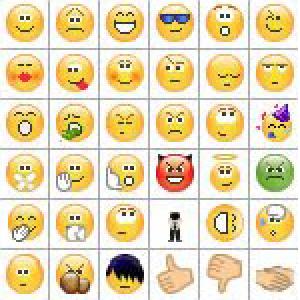
Fill up the selection screen with cartoons

images/thumbnail.jpg - Thumbnail

Was SAP born miserable or are SAP-users simply unable to cheer it up?

The truth is that SAP GUI is no rainbow and neither does looking at it bring happiness. Even so, it puts at our disposal a bunch of cartoons that we may use to make it just a little more uplifting.

And take a look at just how easy it is.

If a stranger offers you values, this is Input

images/thumbnail.jpg - Thumbnail

In a report, the values are normally requested from the user at the first selection screen before the program is run. But what if you want to interactively ask for more values in the middle of running the program?

Selection screen with tabs

images/thumbnail.jpg - Thumbnail

The selection screens of ABAP programs have several features that, although complex and easy to use, are generally ignored. Here, I will show you how easy it is to create tabs to better organise the parameters of a program. This time though, and uncommonly, I’ll spare you the verbal onslaught. It’s a practical class.

Multiple choice ALV in a modal dialogue box

images/thumbnail.jpg - Thumbnail

Do you know how to present an ALV with a list of records in a dialogue box allowing multiple choice? I didn’t. But I do now. Let me explain how.

Progress indicator

images/thumbnail.jpg - Thumbnail

You know those progress bars that show how long it will take for a process to end? The ones that sometimes go back to the beginning when they reach the end and leave you frustrated and confused and wondering what use they are anyway? Here’s how you can use them in an ABAP program.

DATA: lv_texto TYPE char40,
      lv_valor type i.

DO 10 TIMES.

  WAIT UP TO 1 SECONDS.

  CLEAR lv_texto.
  lv_valor = sy-index * 10.
  lv_texto(3) = lv_valor.
  CONCATENATE lv_texto '%!' INTO lv_texto.
  CONCATENATE 'Time remaining' lv_texto INTO lv_texto SEPARATED BY space.

  CALL FUNCTION 'SAPGUI_PROGRESS_INDICATOR'
    EXPORTING
      percentage = lv_valor
      text       = lv_texto.

ENDDO.

You see that the timer bar is filling up. Unfortunately the WAIT UP TO N SECONDS command is limited to whole numbers, so I don’t know how you can do a faster count. But it’s better than nothing.

<!--:pt-->Como encavalitar tabelas<!--:-->

images/thumbnail.jpg - Thumbnail

Às vezes temos de criar uma tabela Z. Às vezes temos até de criar várias tabelas Z. Às vezes estas tabelas estão relacionadas de alguma forma. Como quando uma contém dados de cabeçalho e a outra dados de item, por exemplo. Ora se estão relacionadas pode dar jeito que sejam editadas em conjunto. É para isso que servem os Clusters de Visão (view cluster).

<!--:pt-->Enfiar um browser dentro do SAPGui<!--:-->

images/thumbnail.jpg - Thumbnail

Quem não gosta de uma promiscuidadezita de vez em quando? Até o Abapinho. É por isso que hoje vos sugerimos que se deleitem a enfiar um browser dentro do SAPGui. E para conseguir isso basta correr este programa na SE38: SAPHTML_R3HTTP_DEMO.

Pronto, ficam a saber. E como há clientes para tudo, quem sabe não se encontre aí pelo mundo algum cliente que invente um problema para esta solução.

O Abapinho saúda-vos.

<!--:pt-->ALV Grid Control - Manuais de referência<!--:-->

images/thumbnail.jpg - Thumbnail

Os ALVs são poderosos. Mas esse poder vem à custa de alguma complexidade. Além disso, como quase tudo em SAP, funcionam de forma obscura. Aqui ficam dois manuais de referência em PDF. São muito parecidos mas suficientemente diferentes para referir os dois.

Este chama-se BCSRVALV, é da SAP e data de 2001. No site da SAP encontra-se aqui. E aqui também se aprende sobre isto.

Já este chama-se ALV_Grid_Control, é de 2004 e está assinado por um senhor chamado Serdar ŞİMŞEKLER que diz ser turco.